1. Python Cheat Sheet
- 1. Python Cheat Sheet
- 1.1 Getting Started
- 1.2 Basic Syntax
- 1.3 Common Built-in Functions
- 1.4 Modules and Packages
- 1.5 File I/O
- 1.6 String Operations
- 1.7 String Formatting
- 1.8 Decorators
- 1.9 Context Managers
- 1.10 Object-Oriented Programming (OOP)
- 1.11 Metaclasses
- 1.12 Abstract Base Classes (ABCs)
- 1.13 Exception Handling
- 1.14 Iterators and Generators
- 1.15 Special Methods (Magic Methods)
- 1.16 Descriptors
- 1.17 Working with Dates and Times
- 1.18 Working with CSV Files
- 1.19 Working with JSON
- 1.20 Working with Regular Expressions
- 1.21 Working with OS
- 1.22 Working with Collections
- 1.23 Working with Itertools
- 1.24 Working with Functools
- 1.25 Concurrency and Parallelism
- 1.26 Type Hints
- 1.27 Virtual Environments
- 1.28 Testing
- 1.29 Logging
- 1.30 Debugging
- 1.31 Python Memory Model
- 1.32 Common Patterns and Idioms
- 1.33 Best Practices
This cheat sheet provides an exhaustive overview of the Python programming language, covering essential syntax, data structures, functions, modules, and best practices for efficient development. It aims to be a one-stop reference for common tasks.
Python Mindmap - Visual Overview
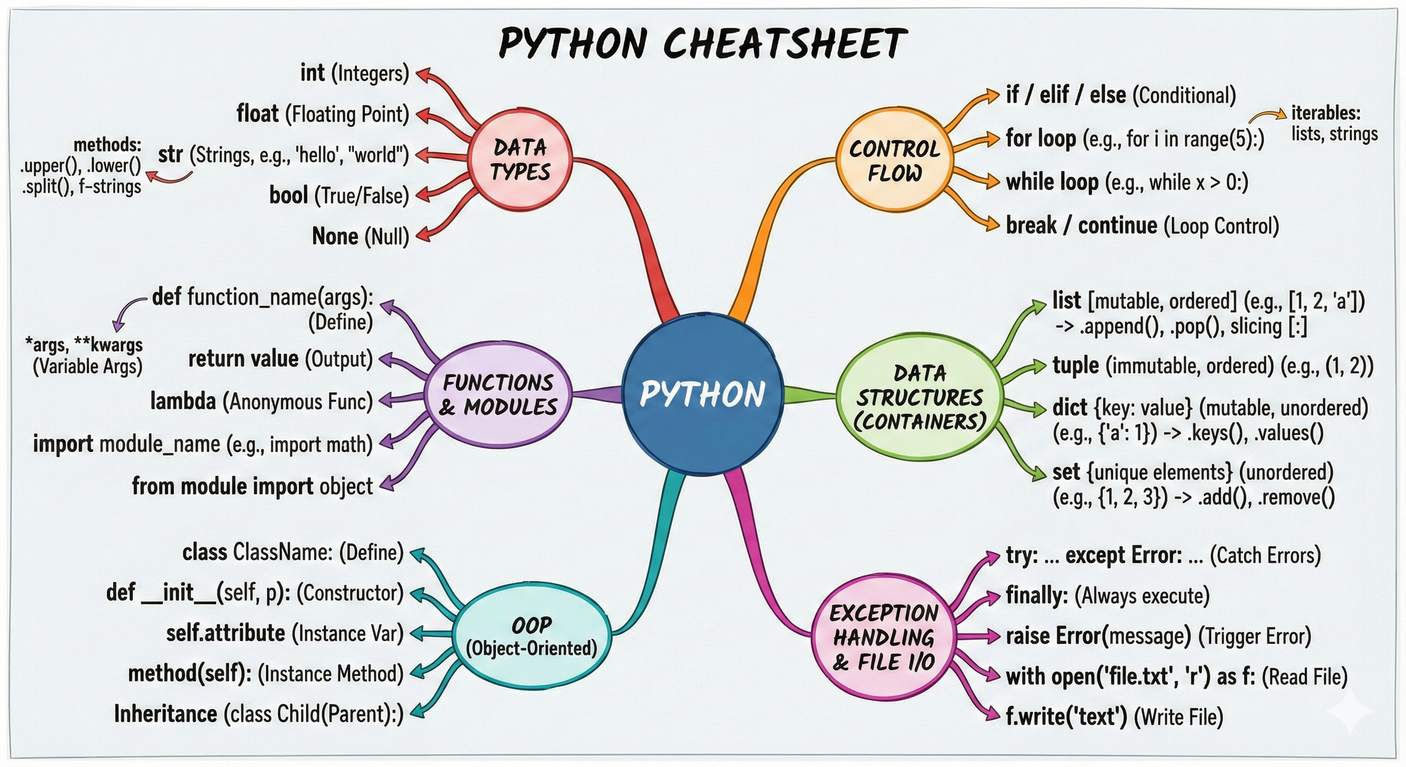
1.1 Getting Started
1.1.1 Installation
Check if Python is already installed:
python --version
python3 --version
Install Python using a package manager (e.g., apt, brew, choco) or from the official website:
1.1.2 Running Python Code
Interactive Mode:
python
python3
Run a Python Script:
python my_script.py
python3 my_script.py
1.2 Basic Syntax
1.2.1 Comments
# This is a single-line comment

"""
This is a multi-line comment
"""
1.2.2 Variables
x = 10
name = "Alice"
is_active = True
1.2.3 Data Types
int - Integer numbers
x = 42 # Immutable, supports +, -, *, /, //, %, **
float - Floating-point numbers
pi = 3.14 # Immutable, supports arithmetic ops, .is_integer()
str - Strings (text)
name = "Alice" # Immutable, supports +, *, slicing, .upper(), .lower(), .split()
bool - Boolean values
is_active = True # Subclass of int (True=1, False=0)
list - Ordered, mutable collection
items = [1, 2, 3] # Mutable, supports indexing, .append(), .extend(), .pop()
tuple - Ordered, immutable collection
coords = (10, 20) # Immutable, faster than lists, supports indexing
dict - Key-value pairs
user = {"name": "Bob", "age": 30} # Mutable, supports .keys(), .values(), .items()
set - Unordered, unique elements
tags = {1, 2, 3} # Mutable, supports .add(), .remove(), set operations (|, &, -)
NoneType - Absence of value
result = None # Singleton object, often used as default/placeholder
1.2.4 Operators
Arithmetic Operators
x, y = 10, 3
x + y    # 13 - Addition
x - y    # 7  - Subtraction
x * y    # 30 - Multiplication
x / y    # 3.33 - Division (float)
x // y   # 3  - Floor division (integer)
x % y    # 1  - Modulus (remainder)
x ** y   # 1000 - Exponentiation (power)
Comparison Operators
x, y = 5, 3
x == y   # False - Equal to
x != y   # True  - Not equal to
x > y    # True  - Greater than
x < y    # False - Less than
x >= y   # True  - Greater than or equal to
x <= y   # False - Less than or equal to
Logical Operators
x, y = True, False
x and y  # False - Logical AND (both must be True)
x or y   # True  - Logical OR (at least one must be True)
not x    # False - Logical NOT (negates the value)
Assignment Operators
x = 10      # Simple assignment
x += 5      # x = x + 5  (compound addition)
x -= 3      # x = x - 3  (compound subtraction)
x *= 2      # x = x * 2  (compound multiplication)
x /= 4      # x = x / 4  (compound division)
x //= 2     # x = x // 2 (compound floor division)
x %= 3      # x = x % 3  (compound modulus)
x **= 2     # x = x ** 2 (compound exponentiation)
Identity Operators
a = [1, 2, 3]
b = a
c = [1, 2, 3]
a is b       # True  - Same object in memory
a is c       # False - Different objects (same values)
a is not c   # True  - Different objects
Membership Operators
my_list = [1, 2, 3, 4, 5]
3 in my_list        # True  - Value exists in sequence
6 in my_list        # False - Value doesn't exist
6 not in my_list    # True  - Value doesn't exist
Bitwise Operators (work on binary representations)
a, b = 5, 3  # Binary: 101, 011
a & b    # 1   - AND (001)
a | b    # 7   - OR (111)
a ^ b    # 6   - XOR (110)
~a       # -6  - NOT (inverts all bits)
a << 1   # 10  - Left shift (1010)
a >> 1   # 2   - Right shift (010)
1.2.5 Control Flow
If Statement Decision Flow
    x = 10
      │
      ↓
  ┌─────────┐
  │  x > 0  │
  └────┬────┘
       │
   ┌───┴───┐
   │       │
   ↓ Yes   ↓ No
┌──────┐  ┌────────┐
│Print │  │ x == 0 │
│Pos.  │  └───┬────┘
└──────┘      │
          ┌───┴───┐
          │       │
          ↓ Yes   ↓ No
       ┌──────┐ ┌──────┐
       │Print │ │Print │
       │Zero  │ │Neg.  │
       └──────┘ └──────┘
If Statement:
x = 10
if x > 0:
    print("Positive")
elif x == 0:
    print("Zero")
else:
    print("Negative")

# Ternary operator (one-line if-else)
result = "Even" if x % 2 == 0 else "Odd"
print(result)  # Output: Even
Loop Execution Flow
For Loop:                While Loop:
┌─────────┐              ┌─────────┐
│ i in    │              │ i < 5   │◄──┐
│ range(5)│              └────┬────┘   │
└────┬────┘                   │        │
     │                        ↓ True   │
     ↓                   ┌─────────┐   │
┌─────────┐              │ Execute │   │
│ Execute │              │  Body   │   │
│  Body   │              └────┬────┘   │
└────┬────┘                   │        │
     │                        ↓        │
     │←────(Next)─────→  ┌─────────┐  │
     ↓                   │  i += 1 │──┘
  Complete               └─────────┘
For Loop:
# Basic for loop
for i in range(5):
    print(i)  # 0, 1, 2, 3, 4

# Iterate with index using enumerate
fruits = ["apple", "banana", "cherry"]
for index, fruit in enumerate(fruits):
    print(f"{index}: {fruit}")

# Iterate over dictionary
user = {"name": "Alice", "age": 30, "city": "NYC"}
for key, value in user.items():
    print(f"{key}: {value}")
While Loop:
i = 0
while i < 5:
    print(i)
    i += 1

# While with else clause (executes if loop completes normally)
i = 0
while i < 3:
    print(i)
    i += 1
else:
    print("Loop completed")
Break and Continue Flow
    Start Loop
        │
        ↓
    ┌───────┐
    │ i==3? │──Yes──► Break ──► Exit Loop
    └───┬───┘
        │ No
        ↓
    ┌───────┐
    │ i==1? │──Yes──► Continue ──┐
    └───┬───┘                     │
        │ No                      │
        ↓                         │
   ┌─────────┐                   │
   │ print(i)│                   │
   └────┬────┘                   │
        │                        │
        └────────────────────────┘
                │
                ↓
            Next Iteration
Break and Continue:
for i in range(10):
    if i == 3:
        break  # Exit the loop immediately
    if i == 1:
        continue  # Skip to the next iteration
    print(i)  # Output: 0, 2

# Using pass (does nothing, placeholder)
for i in range(5):
    if i == 2:
        pass  # Placeholder for future code
    print(i)
Exception Handling Flow
    ┌─────────┐
    │   Try   │
    │  Block  │
    └────┬────┘
         │
         ↓
    ┌─────────┐
    │ Execute │
    │  Code   │
    └────┬────┘
         │
    ┌────┴─────┐
    │          │
    ↓ Success  ↓ Exception
┌────────┐  ┌─────────┐
│  Else  │  │ Except  │
│ Block  │  │  Block  │
└───┬────┘  └────┬────┘
    │            │
    └─────┬──────┘
          ↓
     ┌─────────┐
     │ Finally │
     │  Block  │
     └─────────┘
          │
          ↓
       Complete
Try-Except Block:
# Basic exception handling
try:
    result = 10 / 0
except ZeroDivisionError:
    print("Cannot divide by zero")
finally:
    print("This will always execute")

# Multiple exception types
try:
    value = int("abc")
except (ValueError, TypeError) as e:
    print(f"Conversion error: {e}")
except Exception as e:
    print(f"General error: {e}")
else:
    print("No exception occurred")
finally:
    print("Cleanup code")

# Re-raising exceptions
try:
    result = 10 / 0
except ZeroDivisionError:
    print("Handling error")
    raise  # Re-raise the same exception
1.2.6 Functions
Defining a Function:
def greet(name="World"):
    """This function greets the person passed in as a parameter.
    If no parameter is passed, it greets the world."""
    print(f"Hello, {name}!")

greet("Alice")
greet()
Function Arguments:
Positional Arguments - Required, order matters
def greet(name, age):
    print(f"{name} is {age} years old")
greet("Alice", 30)  # Must provide in order
Keyword Arguments - Named parameters, order flexible
greet(age=30, name="Alice") # Order doesn't matter
Default Arguments - Optional with default values
def greet(name, greeting="Hello"):
    print(f"{greeting}, {name}!")
greet("Alice")           # Uses default greeting
greet("Bob", "Hi")       # Overrides default
*args - Variable positional arguments (tuple)
def sum_all(*numbers):
    return sum(numbers)
sum_all(1, 2, 3, 4, 5)   # Can pass any number of args
**kwargs - Variable keyword arguments (dict)
def print_info(**info):
    for key, value in info.items():
        print(f"{key}: {value}")
print_info(name="Alice", age=30, city="NYC")
Combined Example - All argument types together
def my_function(a, b=2, *args, **kwargs):
    print(f"a: {a}, b: {b}, args: {args}, kwargs: {kwargs}")

my_function(1, 2, 3, 4, name="Alice", age=30)
# Output: a: 1, b: 2, args: (3, 4), kwargs: {'name': 'Alice', 'age': 30}
Lambda Functions:
square = lambda x: x ** 2
print(square(5))
1.2.7 Data Structures
List Operations
    ┌────────────────────────┐
    │    List Methods        │
    ├────────────────────────┤
    │ Modifiers:             │
    │  • append(x)    O(1)   │
    │  • insert(i,x)  O(n)   │
    │  • extend(iter) O(k)   │
    │  • remove(x)    O(n)   │
    │  • pop([i])     O(1)   │
    │  • clear()      O(n)   │
    │  • sort()       O(nlogn)
    │  • reverse()    O(n)   │
    ├────────────────────────┤
    │ Accessors:             │
    │  • index(x)     O(n)   │
    │  • count(x)     O(n)   │
    │  • copy()       O(n)   │
    └────────────────────────┘
Lists:
my_list = [1, 2, "hello", True]

# Adding elements
my_list.append(5)           # Add to end: [1, 2, "hello", True, 5]
my_list.insert(2, "new")    # Insert at index: [1, 2, "new", "hello", True, 5]
my_list.extend([6, 7])      # Extend with iterable: [..., 6, 7]

# Removing elements
my_list.remove(2)           # Remove first occurrence of value
popped = my_list.pop()      # Remove and return last element
popped_at = my_list.pop(1)  # Remove and return element at index
my_list.clear()             # Remove all elements

# List operations
my_list = [3, 1, 4, 1, 5]
my_list.sort()              # Sort in place: [1, 1, 3, 4, 5]
my_list.sort(reverse=True)  # Sort descending: [5, 4, 3, 1, 1]
my_list.reverse()           # Reverse in place
count = my_list.count(1)    # Count occurrences: 2
index = my_list.index(4)    # Find index of first occurrence

# Indexing and slicing
print(my_list[0])           # First element
print(my_list[-1])          # Last element
print(my_list[1:3])         # Slice from index 1 to 3 (exclusive)
print(my_list[::2])         # Every second element
print(my_list[::-1])        # Reverse the list (creates new list)

# List unpacking
first, *middle, last = [1, 2, 3, 4, 5]
print(first, middle, last)  # 1 [2, 3, 4] 5

# List concatenation and repetition
list1 = [1, 2] + [3, 4]     # [1, 2, 3, 4]
list2 = [1, 2] * 3          # [1, 2, 1, 2, 1, 2]
Tuples:
my_tuple = (1, 2, "hello")

# Accessing elements
print(my_tuple[0])          # 1
print(my_tuple[-1])         # "hello"

# Tuple unpacking
x, y, z = my_tuple
print(x, y, z)              # 1 2 hello

# Tuple methods
count = my_tuple.count(1)   # Count occurrences
index = my_tuple.index("hello")  # Find index

# Named tuples (from collections)
from collections import namedtuple
Point = namedtuple('Point', ['x', 'y'])
p = Point(10, 20)
print(p.x, p.y)             # 10 20
Dictionaries:
my_dict = {"name": "Alice", "age": 30}

# Adding/updating elements
my_dict["city"] = "New York"        # Add new key-value
my_dict.update({"job": "Engineer"}) # Update with another dict

# Accessing elements
print(my_dict["name"])              # "Alice"
print(my_dict.get("age"))           # 30
print(my_dict.get("salary", 0))     # 0 (default if key not found)

# Removing elements
value = my_dict.pop("age")          # Remove and return value
my_dict.popitem()                   # Remove and return last item (3.7+)
del my_dict["name"]                 # Delete key
my_dict.clear()                     # Remove all items

# Dictionary views
my_dict = {"name": "Alice", "age": 30, "city": "NYC"}
print(my_dict.keys())               # dict_keys(['name', 'age', 'city'])
print(my_dict.values())             # dict_values(['Alice', 30, 'NYC'])
print(my_dict.items())              # dict_items([...])

# Dictionary operations
new_dict = my_dict.copy()           # Shallow copy
my_dict.setdefault("job", "Engineer")  # Set if key doesn't exist

# Merging dictionaries (Python 3.9+)
dict1 = {"a": 1, "b": 2}
dict2 = {"b": 3, "c": 4}
merged = dict1 | dict2              # {"a": 1, "b": 3, "c": 4}
dict1 |= dict2                      # In-place merge
Sets:
my_set = {1, 2, 3, 4}

# Adding elements
my_set.add(5)                       # Add single element
my_set.update([6, 7, 8])            # Add multiple elements

# Removing elements
my_set.remove(2)                    # Remove (raises KeyError if not found)
my_set.discard(2)                   # Remove (no error if not found)
my_set.pop()                        # Remove and return arbitrary element
my_set.clear()                      # Remove all elements

# Set operations
set1 = {1, 2, 3, 4}
set2 = {3, 4, 5, 6}

union = set1 | set2                 # {1, 2, 3, 4, 5, 6}
intersection = set1 & set2          # {3, 4}
difference = set1 - set2            # {1, 2}
symmetric_diff = set1 ^ set2        # {1, 2, 5, 6}

# Set methods
set1.union(set2)                    # Same as |
set1.intersection(set2)             # Same as &
set1.difference(set2)               # Same as -
set1.symmetric_difference(set2)     # Same as ^

# Set relationships
set1.issubset(set2)                 # Is set1 subset of set2?
set1.issuperset(set2)               # Is set1 superset of set2?
set1.isdisjoint(set2)               # Do sets have no common elements?
1.2.8 List Comprehensions
Comprehension Structure
    [expression for item in iterable if condition]
         │          │         │            │
         │          │         │            └─ Optional filter
         │          │         └────────────── Source
         │          └──────────────────────── Variable
         └─────────────────────────────────── Transform
numbers = [1, 2, 3, 4, 5]

# Basic list comprehension
squares = [x ** 2 for x in numbers]
print(squares)  # [1, 4, 9, 16, 25]

# With conditional filter
even_squares = [x ** 2 for x in numbers if x % 2 == 0]
print(even_squares)  # [4, 16]

# With if-else expression
result = [x if x % 2 == 0 else -x for x in numbers]
print(result)  # [-1, 2, -3, 4, -5]

# Nested list comprehension
matrix = [[1, 2, 3], [4, 5, 6], [7, 8, 9]]
flattened = [num for row in matrix for num in row]
print(flattened)  # [1, 2, 3, 4, 5, 6, 7, 8, 9]

# Transpose matrix
transposed = [[row[i] for row in matrix] for i in range(len(matrix[0]))]
print(transposed)  # [[1, 4, 7], [2, 5, 8], [3, 6, 9]]
1.2.9 Dictionary Comprehensions
numbers = [1, 2, 3, 4, 5]

# Basic dictionary comprehension
square_dict = {x: x ** 2 for x in numbers}
print(square_dict)  # {1: 1, 2: 4, 3: 9, 4: 16, 5: 25}

# With conditional
even_dict = {x: x ** 2 for x in numbers if x % 2 == 0}
print(even_dict)  # {2: 4, 4: 16}

# Swap keys and values
original = {'a': 1, 'b': 2, 'c': 3}
swapped = {value: key for key, value in original.items()}
print(swapped)  # {1: 'a', 2: 'b', 3: 'c'}

# From two lists (zip)
keys = ['name', 'age', 'city']
values = ['Alice', 30, 'NYC']
person = {k: v for k, v in zip(keys, values)}
print(person)  # {'name': 'Alice', 'age': 30, 'city': 'NYC'}
1.2.10 Set Comprehensions
numbers = [1, 2, 2, 3, 4, 4, 5]

# Basic set comprehension (removes duplicates)
unique_squares = {x ** 2 for x in numbers}
print(unique_squares)  # {1, 4, 9, 16, 25}

# With conditional
even_set = {x for x in numbers if x % 2 == 0}
print(even_set)  # {2, 4}
1.2.11 Generators
def my_generator(n):
    for i in range(n):
        yield i ** 2

for value in my_generator(5):
    print(value)  # 0, 1, 4, 9, 16
1.3 Common Built-in Functions
# Type conversion
int("42")          # 42
float("3.14")      # 3.14
str(42)            # "42"
bool(1)            # True
list("abc")        # ['a', 'b', 'c']
tuple([1, 2, 3])   # (1, 2, 3)
set([1, 2, 2, 3])  # {1, 2, 3}
dict([('a', 1)])   # {'a': 1}

# Math functions
abs(-5)            # 5
round(3.14159, 2)  # 3.14
pow(2, 3)          # 8 (same as 2 ** 3)
divmod(17, 5)      # (3, 2) - quotient and remainder
min(1, 2, 3)       # 1
max(1, 2, 3)       # 3
sum([1, 2, 3])     # 6

# Sequence functions
len([1, 2, 3])              # 3
sorted([3, 1, 2])           # [1, 2, 3]
sorted([3, 1, 2], reverse=True)  # [3, 2, 1]
reversed([1, 2, 3])         # <reversed object>
list(reversed([1, 2, 3]))   # [3, 2, 1]

# Enumeration and zipping
for i, val in enumerate(['a', 'b', 'c']):
    print(f"{i}: {val}")  # 0: a, 1: b, 2: c

for x, y in zip([1, 2, 3], ['a', 'b', 'c']):
    print(f"{x}{y}")  # 1a, 2b, 3c

# Filtering and mapping
list(filter(lambda x: x % 2 == 0, [1, 2, 3, 4]))  # [2, 4]
list(map(lambda x: x ** 2, [1, 2, 3]))            # [1, 4, 9]

# All and any
all([True, True, False])   # False (all elements True?)
any([True, False, False])  # True (any element True?)

# Range
list(range(5))           # [0, 1, 2, 3, 4]
list(range(2, 7))        # [2, 3, 4, 5, 6]
list(range(0, 10, 2))    # [0, 2, 4, 6, 8]

# Input/Output
name = input("Enter name: ")  # Read user input
print("Hello", name)          # Print to console
print("Value:", 42, sep='-', end='!\n')  # Custom separator and ending

# Object inspection
type(42)              # <class 'int'>
isinstance(42, int)   # True
hasattr(obj, 'attr')  # Check if object has attribute
getattr(obj, 'attr', default)  # Get attribute with default
setattr(obj, 'attr', value)    # Set attribute
dir(obj)              # List object's attributes

# Variable inspection
id(x)                 # Memory address of object
globals()             # Dictionary of global variables
locals()              # Dictionary of local variables
vars(obj)             # __dict__ attribute of object

# Iteration helpers
iter([1, 2, 3])       # Get iterator from iterable
next(iterator)        # Get next item from iterator
next(iterator, default)  # With default for StopIteration
1.4 Modules and Packages
Import Resolution Flow
    ┌──────────────────┐
    │  import module   │
    └────────┬─────────┘
             │
             ↓
    ┌────────────────────┐
    │  Check sys.modules │──Yes──► Use cached
    │    (cache)         │         module
    └────────┬───────────┘
             │ No
             ↓
    ┌────────────────────┐
    │ Search sys.path:   │
    │ 1. Current dir     │
    │ 2. PYTHONPATH      │
    │ 3. Site-packages   │
    │ 4. Standard lib    │
    └────────┬───────────┘
             │
       ┌─────┴──────┐
       │            │
       ↓ Found     ↓ Not Found
   ┌────────┐   ┌──────────────┐
   │ Load & │   │ModuleNotFound│
   │ Cache  │   │   Error      │
   └────────┘   └──────────────┘
1.4.1 Importing Modules
# Basic imports
import math
print(math.sqrt(16))  # 4.0
print(math.pi)        # 3.141592653589793

# Import with alias
import datetime as dt
now = dt.datetime.now()
print(now)

# Import specific items
from collections import Counter, defaultdict
from math import sqrt, pi

# Import all (not recommended)
from math import *

# Import from submodule
from os.path import join, exists
path = join('/home', 'user', 'file.txt')

# Conditional imports
try:
    import optional_module
except ImportError:
    optional_module = None

# Import inspection
import sys
print(sys.modules)    # Dictionary of loaded modules
print(sys.path)       # List of import search paths

# Relative imports (in packages)
# from . import sibling_module       # Same directory
# from .. import parent_module       # Parent directory
# from ..sibling import module       # Sibling directory
1.4.2 Creating Modules
Create a file named my_module.py:
def my_function():
    print("Hello from my_module!")

my_variable = 10
Import and use the module:
import my_module

my_module.my_function()
print(my_module.my_variable)
1.4.3 Packages
Create a directory named my_package with an __init__.py file inside.
Create modules inside the package (e.g., my_package/module1.py, my_package/module2.py).
Import and use the package:
import my_package.module1
from my_package import module2

my_package.module1.my_function()
module2.another_function()
1.5 File I/O
File Operations Flow
    ┌──────────────┐
    │  open(file)  │
    └──────┬───────┘
           │
      ┌────┴────┐
      │         │
      ↓ 'r'     ↓ 'w'/'a'
   ┌──────┐  ┌──────────┐
   │ Read │  │Write/App │
   └──┬───┘  └────┬─────┘
      │           │
      ↓           ↓
   ┌──────────────────┐
   │  File Operations │
   │  • read()        │
   │  • readline()    │
   │  • readlines()   │
   │  • write()       │
   │  • writelines()  │
   └────────┬─────────┘
            │
            ↓
      ┌──────────┐
      │ close()  │
      └──────────┘
         (auto with 'with')
1.5.1 Reading from a File
# Read entire file
with open("my_file.txt", "r") as f:
    content = f.read()
    print(content)

# Read line by line (memory efficient)
with open("my_file.txt", "r") as f:
    for line in f:
        print(line.strip())

# Read all lines into a list
with open("my_file.txt", "r") as f:
    lines = f.readlines()
    print(lines)

# Read single line
with open("my_file.txt", "r") as f:
    first_line = f.readline()
    second_line = f.readline()

# Read specific number of characters
with open("my_file.txt", "r") as f:
    chunk = f.read(100)  # Read first 100 characters
1.5.2 Writing to a File
# Write to file (overwrites existing content)
with open("my_file.txt", "w") as f:
    f.write("Hello, file!")
    f.write("\nSecond line")

# Write multiple lines
lines = ["Line 1\n", "Line 2\n", "Line 3\n"]
with open("my_file.txt", "w") as f:
    f.writelines(lines)
1.5.3 Appending to a File
# Append to file (preserves existing content)
with open("my_file.txt", "a") as f:
    f.write("\nAppending to the file.")
1.5.4 File Modes
# File modes:
# 'r'  - Read (default)
# 'w'  - Write (truncates file)
# 'a'  - Append
# 'x'  - Exclusive creation (fails if file exists)
# 'b'  - Binary mode
# 't'  - Text mode (default)
# '+'  - Read and write

# Examples:
with open("file.txt", "r") as f:   # Read text
    pass

with open("file.bin", "rb") as f:  # Read binary
    pass

with open("file.txt", "w+") as f:  # Read and write
    f.write("Hello")
    f.seek(0)  # Move to beginning
    content = f.read()

with open("file.txt", "x") as f:   # Create new file (error if exists)
    f.write("New file")
1.5.5 Advanced File Operations
import os
import shutil
from pathlib import Path

# Using pathlib (modern approach)
file_path = Path("my_file.txt")
content = file_path.read_text()
file_path.write_text("New content")

# Check file existence
if file_path.exists():
    print("File exists")

# File information
print(file_path.stat().st_size)  # File size
print(file_path.suffix)          # .txt
print(file_path.stem)            # my_file
print(file_path.name)            # my_file.txt

# Copy, move, delete
shutil.copy("source.txt", "dest.txt")
shutil.move("old.txt", "new.txt")
os.remove("file.txt")

# Working with directories
Path("my_dir").mkdir(exist_ok=True)
Path("my_dir").rmdir()

# List files in directory
for file in Path(".").glob("*.txt"):
    print(file)

# Recursively find files
for file in Path(".").rglob("*.py"):
    print(file)
1.6 String Operations
text = "Hello, World!"

# String methods - Case manipulation
text.upper()            # "HELLO, WORLD!"
text.lower()            # "hello, world!"
text.capitalize()       # "Hello, world!"
text.title()            # "Hello, World!"
text.swapcase()         # "hELLO, wORLD!"

# String methods - Searching
text.find("World")      # 7 (index of first occurrence, -1 if not found)
text.index("World")     # 7 (raises ValueError if not found)
text.rfind("o")         # 8 (last occurrence)
text.count("l")         # 3 (count occurrences)
text.startswith("Hello")  # True
text.endswith("!")      # True

# String methods - Splitting and joining
text.split(", ")        # ["Hello", "World!"]
text.split()            # Split by whitespace: ["Hello,", "World!"]
"a-b-c".split("-")      # ["a", "b", "c"]
"-".join(["a", "b", "c"])  # "a-b-c"
"Hello\nWorld\n".splitlines()  # ["Hello", "World"]

# String methods - Stripping
"  hello  ".strip()     # "hello" (remove leading/trailing whitespace)
"  hello  ".lstrip()    # "hello  " (left strip)
"  hello  ".rstrip()    # "  hello" (right strip)
"...hello...".strip(".") # "hello"

# String methods - Replacing
text.replace("World", "Python")  # "Hello, Python!"
text.replace("l", "L", 2)        # "HeLLo, World!" (max 2 replacements)

# String methods - Checking
"123".isdigit()         # True (all digits)
"abc".isalpha()         # True (all alphabetic)
"abc123".isalnum()      # True (all alphanumeric)
"HELLO".isupper()       # True
"hello".islower()       # True
"   ".isspace()         # True (all whitespace)
"Hello World".istitle() # True (title case)

# String methods - Padding and alignment
"hello".center(10)      # "  hello   "
"hello".ljust(10, "-")  # "hello-----"
"hello".rjust(10, "-")  # "-----hello"
"42".zfill(5)           # "00042" (zero padding)

# String slicing
text[0]                 # "H" (first character)
text[-1]                # "!" (last character)
text[0:5]               # "Hello" (slice)
text[7:]                # "World!" (from index to end)
text[:5]                # "Hello" (start to index)
text[::2]               # "Hlo ol!" (every 2nd character)
text[::-1]              # "!dlroW ,olleH" (reverse)

# String checking membership
"Hello" in text         # True
"Python" not in text    # True

# String concatenation
"Hello" + " " + "World" # "Hello World"
"Ha" * 3                # "HaHaHa"

# String encoding/decoding
"hello".encode('utf-8') # b'hello' (bytes)
b'hello'.decode('utf-8') # "hello" (string)
1.7 String Formatting
1.7.1 f-strings (Python 3.6+) - Recommended
name = "Alice"
age = 30
pi = 3.14159

# Basic formatting
print(f"My name is {name} and I am {age} years old.")

# Expressions inside braces
print(f"Next year I'll be {age + 1}")
print(f"Uppercase name: {name.upper()}")

# Number formatting
print(f"Pi: {pi:.2f}")           # "Pi: 3.14" (2 decimal places)
print(f"Number: {42:05d}")       # "Number: 00042" (zero-padded)
print(f"Percentage: {0.875:.1%}")  # "Percentage: 87.5%"
print(f"Scientific: {1000000:.2e}")  # "Scientific: 1.00e+06"

# Alignment and width
print(f"{'left':<10}")           # "left      "
print(f"{'right':>10}")          # "     right"
print(f"{'center':^10}")         # "  center  "
print(f"{'padded':*>10}")        # "***padded"

# Dictionary formatting
user = {"name": "Bob", "age": 25}
print(f"User: {user['name']}, Age: {user['age']}")

# Date formatting
from datetime import datetime
now = datetime.now()
print(f"Date: {now:%Y-%m-%d %H:%M:%S}")

# Debug formatting (Python 3.8+)
x = 10
print(f"{x=}")                   # "x=10"
print(f"{x*2=}")                 # "x*2=20"
1.7.2 str.format()
name = "Alice"
age = 30

# Basic formatting
print("My name is {} and I am {} years old.".format(name, age))

# Positional arguments
print("{0} is {1} years old. {0} likes Python.".format(name, age))

# Named arguments
print("{name} is {age} years old.".format(name=name, age=age))

# Number formatting
print("Pi: {:.2f}".format(3.14159))
print("Number: {:05d}".format(42))

# Alignment
print("{:<10}".format("left"))
print("{:>10}".format("right"))
print("{:^10}".format("center"))
1.7.3 % Formatting (Old Style)
name = "Alice"
age = 30

# Basic formatting
print("My name is %s and I am %d years old." % (name, age))

# Number formatting
print("Pi: %.2f" % 3.14159)
print("Number: %05d" % 42)
1.8 Decorators
Decorator Execution Flow
    ┌──────────────┐
    │  Decorator   │
    │   Function   │
    └──────┬───────┘
           │
           ↓ Wraps
    ┌──────────────┐
    │   Original   │
    │   Function   │
    └──────┬───────┘
           │
           ↓ Returns
    ┌──────────────┐
    │   Wrapper    │
    │   Function   │
    └──────┬───────┘
           │
           ↓ Call
    ┌──────────────┐
    │ Before Logic │
    └──────┬───────┘
           │
           ↓
    ┌──────────────┐
    │   Original   │
    │   Execution  │
    └──────┬───────┘
           │
           ↓
    ┌──────────────┐
    │ After Logic  │
    └──────┬───────┘
           │
           ↓
        Return
def my_decorator(func):
    def wrapper(*args, **kwargs):
        print("Before function execution")
        result = func(*args, **kwargs)
        print("After function execution")
        return result
    return wrapper

@my_decorator
def say_hello(name):
    print(f"Hello, {name}!")

say_hello("Alice")
# Output:
# Before function execution
# Hello, Alice!
# After function execution

# Decorator syntax is equivalent to:
# say_hello = my_decorator(say_hello)
1.8.1 Decorators with Arguments
def repeat(num_times):
    def decorator_repeat(func):
        def wrapper(*args, **kwargs):
            for _ in range(num_times):
                result = func(*args, **kwargs)
            return result
        return wrapper
    return decorator_repeat

@repeat(num_times=3)
def greet(name):
    print(f"Hello {name}")

greet("Alice")
1.9 Context Managers
Context Manager Flow
    ┌──────────────┐
    │  with block  │
    └──────┬───────┘
           │
           ↓
    ┌──────────────┐
    │ __enter__()  │
    │   Called     │
    └──────┬───────┘
           │
           ↓
    ┌──────────────┐
    │  Execute     │
    │  with body   │
    └──────┬───────┘
           │
      ┌────┴────┐
      │         │
      ↓ Normal ↓ Exception
    ┌─────┐  ┌──────┐
    │ No  │  │ Pass │
    │ Exc │  │ Exc  │
    └──┬──┘  └───┬──┘
       │         │
       └────┬────┘
            ↓
    ┌──────────────┐
    │  __exit__()  │
    │   Called     │
    └──────────────┘
            │
            ↓
         Cleanup
# File handling with context manager
with open("my_file.txt", "r") as f:
    content = f.read()
    print(content)
# File is automatically closed after the block

# Multiple context managers
with open("input.txt", "r") as infile, open("output.txt", "w") as outfile:
    content = infile.read()
    outfile.write(content.upper())

# Custom context manager using class
class MyContextManager:
    def __enter__(self):
        print("Entering the context")
        return self

    def __exit__(self, exc_type, exc_val, exc_tb):
        print("Exiting the context")
        if exc_type:
            print(f"An exception occurred: {exc_type}")
            return False  # False = re-raise exception, True = suppress
        return True

    def do_something(self):
        print("Doing something in the context")

with MyContextManager() as cm:
    cm.do_something()

# Context manager using contextlib decorator
from contextlib import contextmanager

@contextmanager
def file_manager(filename, mode):
    print(f"Opening {filename}")
    file = open(filename, mode)
    try:
        yield file  # Provide the resource
    finally:
        print(f"Closing {filename}")
        file.close()

with file_manager("test.txt", "w") as f:
    f.write("Hello World")
1.10 Object-Oriented Programming (OOP)
Class Structure
    ┌─────────────────────┐
    │      Class          │
    ├─────────────────────┤
    │   Attributes        │
    │   • instance vars   │
    │   • class vars      │
    ├─────────────────────┤
    │   Methods           │
    │   • __init__()      │
    │   • instance methods│
    │   • class methods   │
    │   • static methods  │
    └─────────────────────┘
             │
             ↓ instantiate
    ┌─────────────────────┐
    │      Object         │
    │   (Instance)        │
    └─────────────────────┘
1.10.1 Classes and Objects
class Dog:
    # Class variable (shared by all instances)
    species = "Canis familiaris"

    def __init__(self, name, breed, age=0):
        # Instance variables (unique to each instance)
        self.name = name
        self.breed = breed
        self.age = age

    def bark(self):
        print(f"{self.name} says Woof!")

    def birthday(self):
        self.age += 1
        return self.age

    def __str__(self):
        return f"{self.name} is a {self.age}-year-old {self.breed}"

# Creating instances
my_dog = Dog("Buddy", "Golden Retriever", 3)
print(my_dog.name)  # Buddy
my_dog.bark()  # Buddy says Woof!
print(my_dog)  # Buddy is a 3-year-old Golden Retriever
Inheritance Hierarchy
         ┌──────────┐
         │  Animal  │
         │  (Base)  │
         └────┬─────┘
              │
       ┌──────┴──────┐
       │             │
       ↓             ↓
   ┌───────┐    ┌───────┐
   │  Dog  │    │  Cat  │
   │(Child)│    │(Child)│
   └───────┘    └───────┘
       │             │
       ↓             ↓
   speak():      speak():
   "Woof!"       "Meow!"
1.10.2 Inheritance
class Animal:
    def __init__(self, name):
        self.name = name

    def speak(self):
        raise NotImplementedError("Subclass must implement abstract method")

    def introduce(self):
        return f"I am {self.name}"

class Dog(Animal):
    def __init__(self, name, breed):
        super().__init__(name)  # Call parent __init__
        self.breed = breed

    def speak(self):
        return "Woof!"

class Cat(Animal):
    def __init__(self, name, color):
        super().__init__(name)
        self.color = color

    def speak(self):
        return "Meow!"

# Usage
dog = Dog("Buddy", "Golden Retriever")
cat = Cat("Whiskers", "Orange")
print(dog.speak())      # Woof!
print(cat.speak())      # Meow!
print(dog.introduce())  # I am Buddy

# Check inheritance
print(isinstance(dog, Animal))  # True
print(issubclass(Dog, Animal))  # True
Multiple Inheritance
class Flyable:
    def fly(self):
        return "Flying!"

class Swimmable:
    def swim(self):
        return "Swimming!"

class Duck(Animal, Flyable, Swimmable):
    def speak(self):
        return "Quack!"

duck = Duck("Donald")
print(duck.speak())  # Quack!
print(duck.fly())    # Flying!
print(duck.swim())   # Swimming!
1.10.3 Encapsulation
class MyClass:
    def __init__(self):
        self._protected_variable = 10  # Protected variable (convention)
        self.__private_variable = 20  # Private variable (name mangling)

    def get_private(self): #getter
        return self.__private_variable

    def set_private(self, value): #setter
        if value > 0:
            self.__private_variable = value

obj = MyClass()
print(obj._protected_variable)
# print(obj.__private_variable)  # AttributeError: 'MyClass' object has no attribute '__private_variable'
print(obj.get_private()) # Accessing private variable through a getter method.
obj.set_private(30)
print(obj.get_private())
1.10.4 Polymorphism
class Animal:
    def speak(self):
        raise NotImplementedError("Subclass must implement abstract method")

class Dog(Animal):
    def speak(self):
        return "Woof!"

class Cat(Animal):
    def speak(self):
        return "Meow!"

def animal_sound(animal):
    print(animal.speak())

dog = Dog("Buddy")
cat = Cat("Whiskers")
animal_sound(dog)
animal_sound(cat)
1.10.5 Class Methods and Static Methods
class MyClass:
    class_variable = 0

    def __init__(self, instance_variable):
        self.instance_variable = instance_variable

    @classmethod
    def increment_class_variable(cls):
        cls.class_variable += 1

    @staticmethod
    def static_method():
        print("This is a static method")

MyClass.increment_class_variable()
print(MyClass.class_variable)
MyClass.static_method()
1.11 Metaclasses
class MyMetaclass(type):
    def __new__(cls, name, bases, attrs):
        attrs['attribute'] = 100
        return super().__new__(cls, name, bases, attrs)

class MyClass(metaclass=MyMetaclass):
    pass

obj = MyClass()
print(obj.attribute)  # Output: 100
1.12 Abstract Base Classes (ABCs)
from abc import ABC, abstractmethod

class MyAbstractClass(ABC):
    @abstractmethod
    def my_method(self):
        pass

class MyConcreteClass(MyAbstractClass):
    def my_method(self):
        print("Implementation of my_method")

# obj = MyAbstractClass()  # TypeError: Can't instantiate abstract class MyAbstractClass with abstract methods my_method
obj = MyConcreteClass()
obj.my_method()
1.13 Exception Handling
try:
    result = 10 / 0
except ZeroDivisionError:
    print("Cannot divide by zero")
except Exception as e:
    print(f"An error occurred: {e}")
else:
    print("No errors occurred")
finally:
    print("This will always execute")
1.13.1 Raising Exceptions
def divide(x, y):
    if y == 0:
        raise ValueError("Cannot divide by zero")
    return x / y
1.13.2 Custom Exceptions
class MyCustomError(Exception):
    pass

def my_function():
    raise MyCustomError("Something went wrong")
1.14 Iterators and Generators
Iterator Protocol Flow
    ┌──────────────┐
    │   Iterable   │
    │   (List/Set) │
    └──────┬───────┘
           │ iter()
           ↓
    ┌──────────────┐
    │   Iterator   │
    └──────┬───────┘
           │
           ↓ next()
    ┌──────────────┐
    │  Return Item │
    └──────┬───────┘
           │
      ┌────┴────┐
      │         │
      ↓ More   ↓ Empty
   ┌─────┐  ┌──────────┐
   │Loop │  │   Raise  │
   │Back │  │StopIter  │
   └─────┘  └──────────┘
1.14.1 Iterators
# Basic iterator usage
my_list = [1, 2, 3]
my_iterator = iter(my_list)
print(next(my_iterator))  # 1
print(next(my_iterator))  # 2
print(next(my_iterator))  # 3
# next(my_iterator)  # Raises StopIteration

# Custom iterator class
class Counter:
    def __init__(self, start, end):
        self.current = start
        self.end = end

    def __iter__(self):
        return self

    def __next__(self):
        if self.current >= self.end:
            raise StopIteration
        self.current += 1
        return self.current - 1

counter = Counter(0, 5)
for num in counter:
    print(num)  # 0, 1, 2, 3, 4
Generator Execution Flow
    ┌──────────────┐
    │  Generator   │
    │   Function   │
    └──────┬───────┘
           │ call
           ↓
    ┌──────────────┐
    │  Generator   │
    │   Object     │
    └──────┬───────┘
           │
           ↓ next()
    ┌──────────────┐
    │  Execute     │
    │  until yield │
    └──────┬───────┘
           │
           ↓
    ┌──────────────┐
    │ Return Value │
    │  & Suspend   │
    └──────┬───────┘
           │
           ↓ next()
    ┌──────────────┐
    │   Resume &   │
    │   Continue   │
    └──────┬───────┘
           │
      ┌────┴────┐
      │         │
      ↓ yield  ↓ return/end
   ┌─────┐  ┌──────────┐
   │Loop │  │   Raise  │
   │Back │  │StopIter  │
   └─────┘  └──────────┘
1.14.2 Generators
# Basic generator function
def my_generator(n):
    for i in range(n):
        yield i ** 2

for value in my_generator(5):
    print(value)  # 0, 1, 4, 9, 16

# Generator with state
def countdown(n):
    print("Starting countdown")
    while n > 0:
        yield n
        n -= 1
    print("Countdown complete!")

counter = countdown(3)
print(next(counter))  # Starting countdown, then 3
print(next(counter))  # 2
print(next(counter))  # 1
# next(counter)  # Countdown complete!, then StopIteration

# Generator expression (memory efficient)
squares = (x**2 for x in range(5))
for square in squares:
    print(square)  # 0, 1, 4, 9, 16

# Generator for reading large files (memory efficient)
def read_large_file(file_path):
    with open(file_path, 'r') as file:
        for line in file:
            yield line.strip()

# Fibonacci generator
def fibonacci():
    a, b = 0, 1
    while True:
        yield a
        a, b = b, a + b

fib = fibonacci()
print([next(fib) for _ in range(10)])  # [0, 1, 1, 2, 3, 5, 8, 13, 21, 34]

# Generator delegation with yield from
def chain_generators(*generators):
    for gen in generators:
        yield from gen

gen1 = (x for x in range(3))
gen2 = (x for x in range(3, 6))
for val in chain_generators(gen1, gen2):
    print(val)  # 0, 1, 2, 3, 4, 5
1.15 Special Methods (Magic Methods)
Common Dunder Methods
    Object Lifecycle:
    • __new__(cls)         - Create instance
    • __init__(self)       - Initialize instance
    • __del__(self)        - Delete instance

    String Representation:
    • __str__(self)        - Human-readable (print)
    • __repr__(self)       - Developer-friendly (debugging)
    • __format__(self)     - Custom formatting

    Comparison:
    • __eq__(self, other)  - ==
    • __ne__(self, other)  - !=
    • __lt__(self, other)  - <
    • __le__(self, other)  - <=
    • __gt__(self, other)  - >
    • __ge__(self, other)  - >=

    Arithmetic:
    • __add__(self, other) - +
    • __sub__(self, other) - -
    • __mul__(self, other) - *
    • __truediv__(self, other) - /
    • __floordiv__(self, other) - //
    • __mod__(self, other) - %
    • __pow__(self, other) - **

    Container:
    • __len__(self)        - len()
    • __getitem__(self, key) - []
    • __setitem__(self, key, value) - []=
    • __delitem__(self, key) - del []
    • __contains__(self, item) - in
    • __iter__(self)       - iter()
    • __next__(self)       - next()

    Callable:
    • __call__(self, ...)  - obj()

    Context Manager:
    • __enter__(self)      - with statement
    • __exit__(self, ...)  - exit context
class Vector:
    def __init__(self, x, y):
        self.x = x
        self.y = y

    def __str__(self):
        """Human-readable string (for print)"""
        return f"Vector({self.x}, {self.y})"

    def __repr__(self):
        """Developer-friendly representation"""
        return f"Vector(x={self.x}, y={self.y})"

    def __eq__(self, other):
        """Equality comparison (==)"""
        return self.x == other.x and self.y == other.y

    def __add__(self, other):
        """Addition operator (+)"""
        return Vector(self.x + other.x, self.y + other.y)

    def __mul__(self, scalar):
        """Multiplication operator (*)"""
        return Vector(self.x * scalar, self.y * scalar)

    def __len__(self):
        """Length of vector"""
        return int((self.x**2 + self.y**2)**0.5)

    def __getitem__(self, index):
        """Index access ([])"""
        if index == 0:
            return self.x
        elif index == 1:
            return self.y
        raise IndexError("Index out of range")

    def __call__(self):
        """Make object callable"""
        return (self.x, self.y)

# Usage
v1 = Vector(1, 2)
v2 = Vector(3, 4)

print(v1)           # Vector(1, 2) - uses __str__
print(repr(v1))     # Vector(x=1, y=2) - uses __repr__
print(v1 == v2)     # False - uses __eq__
v3 = v1 + v2        # Vector(4, 6) - uses __add__
v4 = v1 * 2         # Vector(2, 4) - uses __mul__
print(len(v1))      # 2 - uses __len__
print(v1[0])        # 1 - uses __getitem__
print(v1())         # (1, 2) - uses __call__

# Custom container class
class MyList:
    def __init__(self):
        self.items = []

    def __len__(self):
        return len(self.items)

    def __getitem__(self, index):
        return self.items[index]

    def __setitem__(self, index, value):
        self.items[index] = value

    def __delitem__(self, index):
        del self.items[index]

    def __contains__(self, item):
        return item in self.items

    def __iter__(self):
        return iter(self.items)

    def append(self, item):
        self.items.append(item)

mylist = MyList()
mylist.append(1)
mylist.append(2)
print(len(mylist))     # 2
print(mylist[0])       # 1
print(1 in mylist)     # True
for item in mylist:
    print(item)        # 1, 2
1.16 Descriptors
class MyDescriptor:
    def __get__(self, instance, owner):
        print(f"Getting: instance={instance}, owner={owner}")
        return instance._value

    def __set__(self, instance, value):
        print(f"Setting: instance={instance}, value={value}")
        instance._value = value

    def __delete__(self, instance):
        print(f"Deleting: instance={instance}")
        del instance._value

class MyClass:
    my_attribute = MyDescriptor()

obj = MyClass()
obj.my_attribute = 10
print(obj.my_attribute)
del obj.my_attribute

# Practical descriptor example - Validation
class TypeValidator:
    def __init__(self, type_):
        self.type_ = type_

    def __set_name__(self, owner, name):
        self.name = name

    def __get__(self, instance, owner):
        if instance is None:
            return self
        return instance.__dict__.get(self.name)

    def __set__(self, instance, value):
        if not isinstance(value, self.type_):
            raise TypeError(f"{self.name} must be {self.type_.__name__}")
        instance.__dict__[self.name] = value

class Person:
    name = TypeValidator(str)
    age = TypeValidator(int)

    def __init__(self, name, age):
        self.name = name
        self.age = age

p = Person("Alice", 30)
print(p.name, p.age)  # Alice 30
# p.age = "thirty"    # TypeError: age must be int
1.17 Working with Dates and Times
import datetime

now = datetime.datetime.now()
print(now)

today = datetime.date.today()
print(today)

# Creating datetime objects
dt = datetime.datetime(2024, 1, 1, 12, 30, 0)

# Formatting datetime objects
formatted_date = now.strftime("%Y-%m-%d %H:%M:%S")
print(formatted_date)

# Parsing strings into datetime objects
parsed_date = datetime.datetime.strptime("2024-01-01 12:30:00", "%Y-%m-%d %H:%M:%S")
print(parsed_date)

# Time deltas
delta = datetime.timedelta(days=5, hours=3)
new_date = now + delta
print(new_date)

# Working with timezones
import pytz
timezone = pytz.timezone("America/Los_Angeles")
localized_time = timezone.localize(datetime.datetime(2024, 1, 1, 12, 0, 0))
print(localized_time)
1.18 Working with CSV Files
import csv

# Reading CSV files
with open('my_data.csv', 'r') as file:
    reader = csv.reader(file)
    for row in reader:
        print(row)

# Writing CSV files
data = [['Name', 'Age', 'City'],
        ['Alice', 30, 'New York'],
        ['Bob', 25, 'Paris']]

with open('output.csv', 'w', newline='') as file:
    writer = csv.writer(file)
    writer.writerows(data)

# Reading CSV files as dictionaries
with open('my_data.csv', mode='r') as csv_file:
    csv_reader = csv.DictReader(csv_file)
    for row in csv_reader:
        print(row['Name'], row['Age'], row['City'])

# Writing CSV files from dictionaries
fieldnames = ['Name', 'Age', 'City']
data = [
    {'Name': 'Alice', 'Age': 30, 'City': 'New York'},
    {'Name': 'Bob', 'Age': 25, 'City': 'Paris'}
]

with open('output.csv', mode='w', newline='') as csv_file:
    writer = csv.DictWriter(csv_file, fieldnames=fieldnames)

    writer.writeheader()
    writer.writerows(data)
1.19 Working with JSON
import json

# Serializing Python objects to JSON
data = {"name": "Alice", "age": 30, "city": "New York"}
json_string = json.dumps(data, indent=4) # indent for pretty printing
print(json_string)

# Deserializing JSON to Python objects
parsed_data = json.loads(json_string)
print(parsed_data["name"])

# Reading JSON from a file
with open("data.json", "r") as f:
    data = json.load(f)

# Writing JSON to a file
with open("data.json", "w") as f:
    json.dump(data, f, indent=4)
1.20 Working with Regular Expressions
import re

text = "The quick brown fox jumps over the lazy dog."
pattern = r"\b\w{5}\b"  # Matches 5-letter words

# Search for a pattern
match = re.search(pattern, text)
if match:
    print(match.group(0))

# Find all occurrences of a pattern
matches = re.findall(pattern, text)
print(matches)  # Output: ['quick', 'brown', 'jumps']

# Replace occurrences of a pattern
new_text = re.sub(pattern, "five", text)
print(new_text)

# Split a string by a pattern
parts = re.split(r"\s+", text) # Split by whitespace
print(parts)

# Compile a pattern for reuse
compiled_pattern = re.compile(pattern)
matches = compiled_pattern.findall(text)
1.21 Working with OS
import os

# Get the current working directory
current_directory = os.getcwd()
print(current_directory)

# Change the current working directory
os.chdir("/path/to/new/directory")

# List files and directories
files_and_dirs = os.listdir(".")
print(files_and_dirs)

# Create a directory
os.mkdir("my_new_directory")
os.makedirs("path/to/new/directory") # Creates intermediate directories as needed

# Remove a file
os.remove("my_file.txt")

# Remove a directory
os.rmdir("my_empty_directory")
import shutil
shutil.rmtree("my_directory") # Removes a directory and its contents

# Join path components
new_path = os.path.join(current_directory, "my_folder")
print(new_path)

# Check if a path exists
if os.path.exists(new_path):
    print("Path exists")

# Check if a path is a file
if os.path.isfile("my_file.txt"):
    print("It's a file")

# Check if a path is a directory
if os.path.isdir("my_folder"):
    print("It's a directory")

# Get the file extension
filename, extension = os.path.splitext("my_file.txt")
print(extension)

# Get environment variables
print(os.environ.get("HOME"))
1.22 Working with Collections
import collections

# Counter
my_list = [1, 2, 2, 3, 3, 3, 4, 4, 4, 4]
count = collections.Counter(my_list)
print(count)
print(count.most_common(2))

# defaultdict
my_dict = collections.defaultdict(int)
my_dict["a"] += 1
print(my_dict["a"])
print(my_dict["b"])  # Accessing a missing key returns the default value

# namedtuple
Point = collections.namedtuple("Point", ["x", "y"])
p = Point(10, 20)
print(p.x, p.y)

# deque
my_deque = collections.deque([1, 2, 3])
my_deque.append(4)
my_deque.appendleft(0)
my_deque.pop()
my_deque.popleft()
print(my_deque)

# OrderedDict (less relevant in Python 3.7+ where dicts maintain insertion order)
my_ordered_dict = collections.OrderedDict()
my_ordered_dict['a'] = 1
my_ordered_dict['b'] = 2
my_ordered_dict['c'] = 3
print(my_ordered_dict)

# ChainMap
dict1 = {'a': 1, 'b': 2}
dict2 = {'c': 3, 'd': 4}
chain = collections.ChainMap(dict1, dict2)
print(chain['a'])
print(chain['c'])
1.23 Working with Itertools
import itertools

# Count
for i in itertools.count(start=10, step=2):
    if i > 20:
        break
    print(i)

# Cycle
count = 0
for item in itertools.cycle(['A', 'B', 'C']):
    if count > 5:
        break
    print(item)
    count += 1

# Repeat
for item in itertools.repeat("Hello", 3):
    print(item)

# Chain
list1 = [1, 2, 3]
list2 = [4, 5, 6]
for item in itertools.chain(list1, list2):
    print(item)

# Combinations
for combo in itertools.combinations([1, 2, 3, 4], 2):
    print(combo)

# Permutations
for perm in itertools.permutations([1, 2, 3], 2):
    print(perm)

# Product
for prod in itertools.product([1, 2], ['a', 'b']):
    print(prod)

# Groupby
data = [('A', 1), ('A', 2), ('B', 3), ('B', 4), ('C', 5)]
for key, group in itertools.groupby(data, key=lambda x: x[0]):
    print(key, list(group))

# islice
data = [1, 2, 3, 4, 5, 6, 7, 8, 9, 10]
for item in itertools.islice(data, 2, 7, 2):  # start, stop, step
    print(item)

# starmap
data = [(1, 2), (3, 4), (5, 6)]
for result in itertools.starmap(lambda x, y: x * y, data):
    print(result)

# takewhile
data = [1, 2, 3, 4, 5, 6, 7, 8, 9, 10]
for item in itertools.takewhile(lambda x: x < 5, data):
    print(item)

# dropwhile
for item in itertools.dropwhile(lambda x: x < 5, data):
    print(item)
1.24 Working with Functools
import functools

# partial
def power(base, exponent):
    return base ** exponent

square = functools.partial(power, exponent=2)
cube = functools.partial(power, exponent=3)

print(square(5))  # Output: 25
print(cube(2))    # Output: 8

# lru_cache
@functools.lru_cache(maxsize=None)
def fibonacci(n):
    if n < 2:
        return n
    return fibonacci(n-1) + fibonacci(n-2)

print(fibonacci(10))

# reduce
numbers = [1, 2, 3, 4, 5]
product = functools.reduce(lambda x, y: x * y, numbers)
print(product)

# wraps
def my_decorator(func):
    @functools.wraps(func)
    def wrapper(*args, **kwargs):
        """Wrapper function docstring"""
        print("Before function execution")
        result = func(*args, **kwargs)
        print("After function execution")
        return result
    return wrapper

@my_decorator
def say_hello(name):
    """This function greets the person passed in as a parameter."""
    print(f"Hello, {name}!")

print(say_hello.__name__) # Output: say_hello
print(say_hello.__doc__) # Output: This function greets the person passed in as a parameter.
1.25 Concurrency and Parallelism
Threading vs Multiprocessing
Threading (Shared Memory):        Multiprocessing (Separate Memory):

┌────────────────────────┐        ┌───────────┐  ┌───────────┐
│      Main Process      │        │ Process 1 │  │ Process 2 │
│  ┌──────────────────┐  │        │           │  │           │
│  │   Shared Memory  │  │        │  ┌─────┐  │  │  ┌─────┐  │
│  └────────┬─────────┘  │        │  │ Mem │  │  │  │ Mem │  │
│           │            │        │  └─────┘  │  │  └─────┘  │
│  ┌────────┼────────┐   │        └───────────┘  └───────────┘
│  │        │        │   │              ↕              ↕
│  ↓        ↓        ↓   │        ┌─────────────────────────┐
│Thread1 Thread2 Thread3│        │     IPC (Pipes/Queue)   │
└────────────────────────┘        └─────────────────────────┘

• GIL limitation              • True parallelism
• I/O bound tasks            • CPU bound tasks
• Lower overhead             • Higher overhead
1.25.1 Threads
import threading
import time

def my_task(name, duration):
    print(f"Thread {name}: starting")
    time.sleep(duration)
    print(f"Thread {name}: finishing")

# Basic thread usage
threads = []
for i in range(3):
    t = threading.Thread(target=my_task, args=(i, 1))
    threads.append(t)
    t.start()

for t in threads:
    t.join()  # Wait for all threads to complete

# Thread with shared data and lock
counter = 0
lock = threading.Lock()

def increment():
    global counter
    for _ in range(100000):
        with lock:  # Acquire lock before modifying shared data
            counter += 1

threads = [threading.Thread(target=increment) for _ in range(5)]
for t in threads:
    t.start()
for t in threads:
    t.join()
print(f"Final counter: {counter}")  # 500000

# Thread-safe queue
from queue import Queue

def producer(queue):
    for i in range(5):
        print(f"Producing {i}")
        queue.put(i)
        time.sleep(0.5)

def consumer(queue):
    while True:
        item = queue.get()
        if item is None:
            break
        print(f"Consuming {item}")
        queue.task_done()

q = Queue()
prod_thread = threading.Thread(target=producer, args=(q,))
cons_thread = threading.Thread(target=consumer, args=(q,))

prod_thread.start()
cons_thread.start()

prod_thread.join()
q.put(None)  # Signal consumer to stop
cons_thread.join()
1.25.2 Processes
import multiprocessing
import time

def my_task(name, duration):
    print(f"Process {name}: starting")
    time.sleep(duration)
    print(f"Process {name}: finishing")
    return name * 2

# Basic process usage
processes = []
for i in range(3):
    p = multiprocessing.Process(target=my_task, args=(i, 1))
    processes.append(p)
    p.start()

for p in processes:
    p.join()  # Wait for all processes to complete

# Process with return values using Pool
def square(n):
    return n * n

with multiprocessing.Pool(processes=4) as pool:
    results = pool.map(square, range(10))
    print(results)  # [0, 1, 4, 9, 16, 25, 36, 49, 64, 81]

# Process communication using Queue
def worker(queue):
    while True:
        item = queue.get()
        if item is None:
            break
        print(f"Processing: {item}")

if __name__ == "__main__":
    queue = multiprocessing.Queue()
    proc = multiprocessing.Process(target=worker, args=(queue,))
    proc.start()

    for i in range(5):
        queue.put(i)

    queue.put(None)  # Signal to stop
    proc.join()
1.25.3 Asyncio
Async/Await Execution Flow
    ┌─────────────┐
    │   Event     │
    │    Loop     │
    └──────┬──────┘
           │
     ┌─────┴─────┐
     │           │
     ↓           ↓
┌─────────┐ ┌─────────┐
│ Task 1  │ │ Task 2  │
└────┬────┘ └────┬────┘
     │           │
     ↓ await     ↓ await
┌─────────┐ ┌─────────┐
│  I/O    │ │  I/O    │
│  Wait   │ │  Wait   │
└────┬────┘ └────┬────┘
     │           │
     │  suspend  │
     └─────┬─────┘
           │
           ↓
    ┌──────────┐
    │  Switch  │
    │   Task   │
    └──────┬───┘
           │
     ┌─────┴─────┐
     │           │
     ↓ ready     ↓ ready
  Resume      Resume
   Task 1      Task 2
import asyncio

async def my_coroutine(name, delay):
    print(f"Coroutine {name}: starting")
    await asyncio.sleep(delay)
    print(f"Coroutine {name}: finishing")
    return f"Result from {name}"

async def main():
    # Run coroutines concurrently
    tasks = [my_coroutine(i, 1) for i in range(3)]
    results = await asyncio.gather(*tasks)
    print(results)

asyncio.run(main())

# Creating and managing tasks
async def task_with_timeout():
    try:
        result = await asyncio.wait_for(my_coroutine("timeout", 5), timeout=2)
    except asyncio.TimeoutError:
        print("Task timed out!")

asyncio.run(task_with_timeout())

# Async context manager
class AsyncContextManager:
    async def __aenter__(self):
        print("Entering async context")
        await asyncio.sleep(1)
        return self

    async def __aexit__(self, exc_type, exc_val, exc_tb):
        print("Exiting async context")
        await asyncio.sleep(1)

async def use_async_context():
    async with AsyncContextManager() as cm:
        print("Inside async context")

asyncio.run(use_async_context())

# Async iterator
class AsyncIterator:
    def __init__(self, count):
        self.count = count
        self.current = 0

    def __aiter__(self):
        return self

    async def __anext__(self):
        if self.current >= self.count:
            raise StopAsyncIteration
        await asyncio.sleep(0.5)
        self.current += 1
        return self.current - 1

async def use_async_iterator():
    async for item in AsyncIterator(5):
        print(f"Item: {item}")

asyncio.run(use_async_iterator())

# Async comprehension
async def async_gen():
    for i in range(5):
        await asyncio.sleep(0.1)
        yield i * 2

async def use_async_comprehension():
    result = [x async for x in async_gen()]
    print(result)  # [0, 2, 4, 6, 8]

asyncio.run(use_async_comprehension())
1.25.4 ThreadPoolExecutor
from concurrent.futures import ThreadPoolExecutor

def task(n):
    print(f"Processing {n}")
    return n * 2

with ThreadPoolExecutor(max_workers=3) as executor:
    results = executor.map(task, range(5))
    for result in results:
        print(result)
1.25.5 ProcessPoolExecutor
from concurrent.futures import ProcessPoolExecutor

def task(n):
    print(f"Processing {n}")
    return n * 2

with ProcessPoolExecutor(max_workers=3) as executor:
    results = executor.map(task, range(5))
    for result in results:
        print(result)
1.26 Type Hints
def add(x: int, y: int) -> int:
    return x + y

def greet(name: str) -> str:
    return f"Hello, {name}!"

from typing import List, Tuple, Dict, Optional, Union, Any

my_list: List[int] = [1, 2, 3]
my_tuple: Tuple[str, int] = ("Alice", 30)
my_dict: Dict[str, int] = {"a": 1, "b": 2}

def process_item(item: Union[str, int]) -> Optional[str]:
    if isinstance(item, str):
        return item.upper()
    elif isinstance(item, int):
        return str(item * 2)
    else:
        return None

def my_function(x: Any) -> None:
    pass
1.27 Virtual Environments
1.27.1 Using venv (Built-in)
Creating a Virtual Environment
python -m venv myenv
Activating a Virtual Environment
On Linux/macOS:
source myenv/bin/activate
On Windows:
myenv\Scripts\activate
Deactivating a Virtual Environment
deactivate
1.27.2 Using Conda
Creating a Conda Environment
# Create environment with specific Python version
conda create --name myenv python=3.11

# Create environment with packages
conda create --name myenv python=3.11 numpy pandas scikit-learn

# Create from environment.yml file
conda env create -f environment.yml
Activating a Conda Environment
conda activate myenv
Deactivating a Conda Environment
conda deactivate
Managing Conda Environments
# List all environments
conda env list

# Remove an environment
conda env remove --name myenv

# Export environment to file
conda env export > environment.yml

# Clone an environment
conda create --name newenv --clone myenv
Installing Packages in Conda
# Install packages
conda install numpy pandas matplotlib

# Install specific version
conda install numpy=1.24.0

# Install from conda-forge channel
conda install -c conda-forge package_name

# List installed packages
conda list

# Update a package
conda update numpy

# Update all packages
conda update --all
1.28 Testing
1.28.1 Using unittest
import unittest

class MyTestCase(unittest.TestCase):
    def test_addition(self):
        self.assertEqual(1 + 1, 2)

    def test_subtraction(self):
        self.assertNotEqual(5 - 2, 4)

    def test_raises_exception(self):
        with self.assertRaises(ValueError):
            raise ValueError

if __name__ == '__main__':
    unittest.main()
1.28.2 Using pytest
Installation:
pip install pytest
Test Example:
# test_my_module.py
def add(x, y):
    return x + y

def test_add():
    assert add(1, 2) == 3
    assert add(-1, 1) == 0
Run tests:
pytest
1.29 Logging
import logging

# Basic configuration
logging.basicConfig(level=logging.DEBUG, format='%(asctime)s - %(name)s - %(levelname)s - %(message)s')

# Create a logger
logger = logging.getLogger(__name__)

# Log messages
logger.debug("This is a debug message")
logger.info("This is an info message")
logger.warning("This is a warning message")
logger.error("This is an error message")
logger.critical("This is a critical message")

# Logging to a file
file_handler = logging.FileHandler('my_log.log')
file_handler.setLevel(logging.WARNING)
formatter = logging.Formatter('%(asctime)s - %(name)s - %(levelname)s - %(message)s')
file_handler.setFormatter(formatter)
logger.addHandler(file_handler)
1.30 Debugging
1.30.1 Using pdb (Python Debugger)
import pdb

def my_function(x, y):
    z = x + y
    pdb.set_trace()  # Set a breakpoint
    return z

my_function(1, 2)
1.30.2 Using print() Statements
def my_function(x, y):
    print(f"x: {x}, y: {y}")
    z = x + y
    print(f"z: {z}")
    return z
1.31 Python Memory Model
Variable Assignment and References
    Immutable Objects:          Mutable Objects:

    x = 5                       list1 = [1, 2, 3]
    ┌───┐                       ┌───────┐
    │ x │──→ [5]                │ list1 │──→ [1, 2, 3]
    └───┘   (int object)        └───────┘   (list object)

    y = x                       list2 = list1
    ┌───┐                       ┌───────┐
    │ y │──→ [5]                │ list2 │──┐
    └───┘   (same object)       └───────┘  │
                                           ↓
    x = 10                           [1, 2, 3]
    ┌───┐                           (same object!)
    │ x │──→ [10]
    └───┘   (new object)        list1.append(4)
                                     ↓
    y still points to [5]       [1, 2, 3, 4]
                                (both see changes!)
# Immutable types: int, float, str, tuple
x = 5
y = x
x = 10
print(y)  # 5 (y not affected)

# Mutable types: list, dict, set
list1 = [1, 2, 3]
list2 = list1
list1.append(4)
print(list2)  # [1, 2, 3, 4] (list2 affected!)

# Shallow copy vs Deep copy
import copy

# Shallow copy (copies outer structure only)
list1 = [[1, 2], [3, 4]]
list2 = list1.copy()  # or list1[:]
list1[0][0] = 999
print(list2)  # [[999, 2], [3, 4]] (inner list affected!)

# Deep copy (copies everything recursively)
list1 = [[1, 2], [3, 4]]
list2 = copy.deepcopy(list1)
list1[0][0] = 999
print(list2)  # [[1, 2], [3, 4]] (not affected!)

# Object identity
x = [1, 2, 3]
y = [1, 2, 3]
z = x

print(x == y)   # True (same values)
print(x is y)   # False (different objects)
print(x is z)   # True (same object)
print(id(x), id(y), id(z))  # Different ids for x and y

# Interning (small integers and strings)
a = 256
b = 256
print(a is b)   # True (Python interns small integers)

c = 1000
d = 1000
print(c is d)   # False (larger integers not interned)
1.32 Common Patterns and Idioms
# Swap variables
a, b = 1, 2
a, b = b, a
print(a, b)  # 2, 1

# Multiple assignment
x = y = z = 0

# Chained comparison
x = 5
if 0 < x < 10:
    print("x is between 0 and 10")

# Ternary operator
age = 18
status = "adult" if age >= 18 else "minor"

# Default dictionary value
d = {"a": 1}
value = d.get("b", 0)  # 0 (default)

# Enumerate with start index
for i, val in enumerate(['a', 'b', 'c'], start=1):
    print(f"{i}: {val}")

# Zip for parallel iteration
names = ["Alice", "Bob", "Charlie"]
ages = [25, 30, 35]
for name, age in zip(names, ages):
    print(f"{name} is {age}")

# Dictionary from two lists
keys = ["a", "b", "c"]
values = [1, 2, 3]
d = dict(zip(keys, values))

# Merge dictionaries (Python 3.9+)
d1 = {"a": 1, "b": 2}
d2 = {"b": 3, "c": 4}
merged = d1 | d2  # {"a": 1, "b": 3, "c": 4}

# Unpacking in function calls
def add(a, b, c):
    return a + b + c

numbers = [1, 2, 3]
result = add(*numbers)  # Same as add(1, 2, 3)

# Dictionary unpacking
def greet(name, age):
    print(f"{name} is {age}")

person = {"name": "Alice", "age": 30}
greet(**person)  # Same as greet(name="Alice", age=30)

# Check if all/any conditions are true
numbers = [2, 4, 6, 8]
print(all(n % 2 == 0 for n in numbers))  # True
print(any(n > 5 for n in numbers))       # True

# Get first/last N items
my_list = [1, 2, 3, 4, 5]
first_three = my_list[:3]
last_two = my_list[-2:]

# Flatten nested list
nested = [[1, 2], [3, 4], [5, 6]]
flattened = [item for sublist in nested for item in sublist]
print(flattened)  # [1, 2, 3, 4, 5, 6]

# Remove duplicates while preserving order
items = [1, 2, 2, 3, 4, 3, 5]
unique = list(dict.fromkeys(items))
print(unique)  # [1, 2, 3, 4, 5]

# Count occurrences
from collections import Counter
items = ['a', 'b', 'a', 'c', 'b', 'a']
counts = Counter(items)
print(counts.most_common(2))  # [('a', 3), ('b', 2)]

# Try-except-else pattern
try:
    result = 10 / 2
except ZeroDivisionError:
    print("Error!")
else:
    print(f"Result: {result}")  # Executes if no exception

# Context manager for timing
import time
from contextlib import contextmanager

@contextmanager
def timer(name):
    start = time.time()
    yield
    end = time.time()
    print(f"{name} took {end - start:.2f} seconds")

with timer("My operation"):
    time.sleep(1)

# Walrus operator (Python 3.8+)
# Assign and check in one line
if (n := len([1, 2, 3, 4])) > 3:
    print(f"List has {n} items")

# Match-case (Python 3.10+)
status_code = 404

match status_code:
    case 200:
        print("OK")
    case 404:
        print("Not Found")
    case 500 | 502 | 503:
        print("Server Error")
    case _:
        print("Unknown")
1.33 Best Practices
- Use virtual environments to isolate project dependencies.
- Use meaningful names for variables and functions.
- Follow the DRY (Don't Repeat Yourself) principle.
- Write unit tests to ensure code quality.
- Use a consistent coding style (PEP 8).
- Document your code.
- Use a version control system (e.g., Git).
- Use appropriate data types for your data.
- Handle exceptions gracefully.
- Use logging to track events and errors.
- Use a security linter (e.g., Bandit) to identify potential vulnerabilities.
- Follow security best practices.
- Use a linter (like
flake8) and formatter (likeblack) to ensure consistent code style. - Use a code coverage tool (like
coverage.py) to measure test coverage. - Use a static analysis tool (like
mypy) to check for type errors. - Use a profiler to identify performance bottlenecks.
- Use a debugger to step through your code and inspect variables.
- Use a build tool (like
setuptools) to package and distribute your code. - Use a continuous integration (CI) system to automatically run tests and build your code.
- Use a continuous deployment (CD) system to automatically deploy your code to production.
- Use a monitoring tool to track the performance of your application in production.
- Use a configuration management tool (like Ansible, Chef, or Puppet) to manage your infrastructure.
- Use a containerization tool like Docker.
- Use an orchestration tool like Kubernetes.